

Choose a platform
-
 Windows Version 11.9.508
98 MB
DownloadRecommended for your device
Overview
Introduction
When it comes to document management and creation, doPDF is a versatile and convenient tool. Developed by Softland, a company known for its commitment to creating practical solutions, doPDF offers an easy way to convert documents to PDF format. Whether you are a professional working with business reports or a student creating academic papers, doPDF is designed to simplify the process of creating and sharing PDF documents.
The developer behind doPDF
The doPDF software is developed by Softland, a company specialising in developing reliable and user-friendly solutions. Softland's desire to create practical software is reflected in doPDF, which solves the common task of converting documents into the widely used PDF format.
Key features of doPDF
doPDF has a number of features that make it the preferred choice for converting documents:
- Create PDF: doPDF allows users to easily convert documents of various formats (such as Word, Excel, PowerPoint) to PDF.
- Printer Integration: Once installed, doPDF acts as a virtual printer, allowing users to create PDF files from any printed documents.
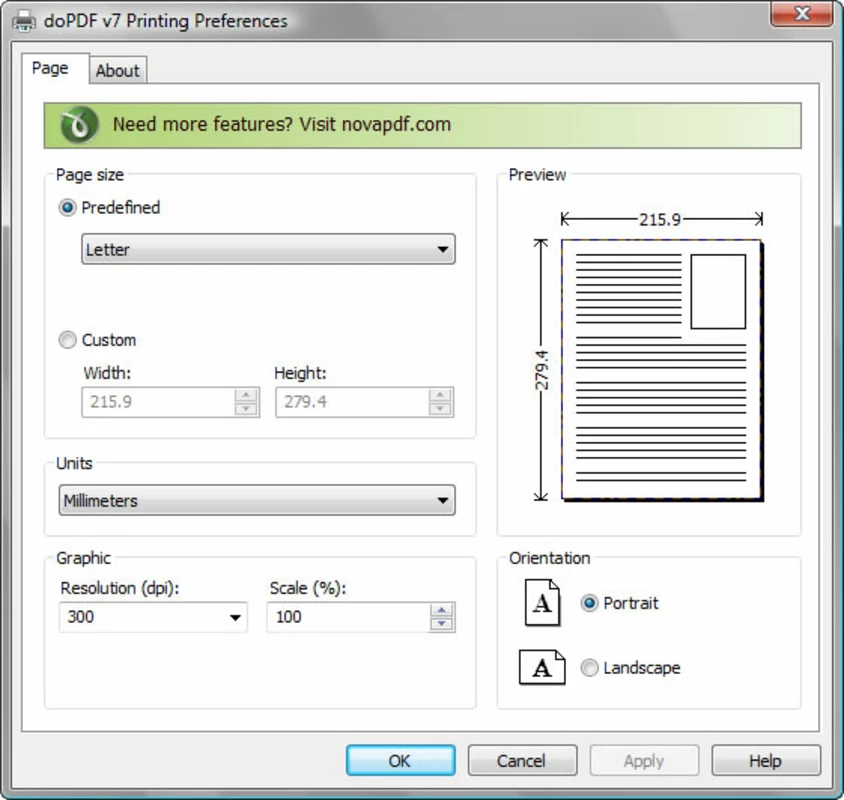
- Customisation options: Users can customise PDF settings, including resolution and page size, according to specific requirements.
- Multi-Language Support: doPDF supports multiple languages, making it accessible to users from all over the world.
- A standalone application: Although integrated with various applications, doPDF can also be used as a standalone application for direct conversion.
User-friendly interface and experience
doPDF has a user-friendly interface that allows you to convert documents to PDF with just a few clicks. The simplicity of the design makes the application easy to navigate for both novice and advanced users.
Conclusion
The doPDF software developed by Softland is a valuable tool for users and professionals who need a simple and efficient way to convert documents to the common PDF format. With its user-friendly interface and customisation options, doPDF simplifies the often complex process of creating PDF files, making it an indispensable application in document management. Whether you are converting business reports, research papers or any other documents, doPDF is a reliable solution for easy PDF creation.
Features
Pros
- Free
- Ease of Use
- Wide Compatibility
- Customization Options
Cons
- Ads in Free Version
- Limited Support
Screenshots
Ask a Question
Is doPDF free to use?
Yes, is available as a free version with essential features. There is also a paid version (doPDF Pro) with additional functionalities.
How does doPDF work?
Works as a virtual printer. Users can select doPDF as their printer, and instead of printing a document on paper, it converts it to a PDF file.
Can doPDF convert all document formats to PDF?
Primarily focuses on converting printable documents. While it supports a wide range of formats, the ability to convert depends on the original document's printability.
Can I customize the settings for PDF conversion in doPDF?
Yes, doPDF provides customization options, allowing users to adjust settings such as resolution and page size for PDF creation.
Can I use doPDF without an internet connection?
Yes, doPDF can be used offline. Once installed, it operates locally on the user's device without requiring an internet connection for the conversion process.
Similar programs
-
 YouTube Music Google LLC
5 (1) Free 6 696
Android, iOS
View YouTube Music -
 ITunes Apple
3 (2) Free 22 387
Windows, Mac OS
View ITunes -
 VirtualDJ Atomix Productions
4 (3) Free 64 537
Windows, Mac OS
View VirtualDJ -
 AOMEI Partition Assistant AOMEI
5 (1) Free 15 855
Windows
View AOMEI Partition Assistant


